What Does Repost Mean on TikTok? (And What It Does to Your Profile)
Quick Answer
Reposting on TikTok shares someone else's video with your followers. It can appear in their feeds credited to you, and it's added to the public Reposts tab on your profile. It does not copy the video or add it to your videos grid; the original creator keeps all views and likes.
The Repost button is one of TikTok's most-tapped and least-understood features, mostly because it sits exactly where a thumb rests mid-scroll.
What actually happens when you tap Repost
- Your followers may see the video in their For You feed, with a small label saying you reposted it. That's the point of the feature: person-to-person amplification.
- The video is added to your profile's Reposts tab, the two-arrows tab next to your videos. This list is public to anyone who can view your profile, and it never expires.
- Nothing is copied. The video stays the creator's; all views, likes, and comments credit them. Your repost is a signal, not a duplicate.
Repost vs. Favorite vs. Like
| Action | Who sees it | Where it's stored |
|---|---|---|
| Repost | Your followers + anyone viewing your profile | Public Reposts tab |
| Favorite | Only you | Private Favorites tab |
| Like | Configurable (default private) | Liked tab (you control visibility) |
If you meant to save a video for yourself, Favorite is the private option. Repost is the megaphone.
The part people forget
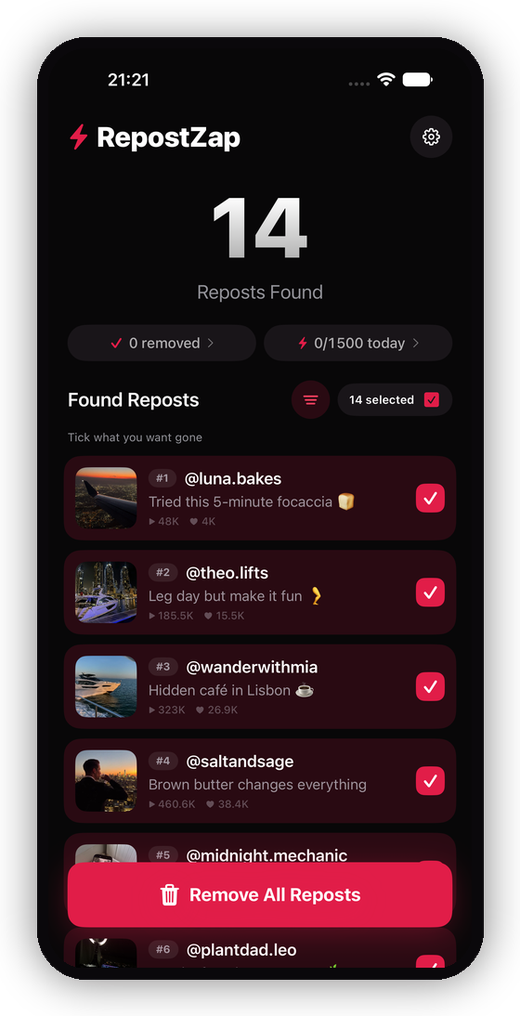
Every repost you've ever made is still sitting in that tab: the sum of years of quick taps, visible to anyone who looks. If that archive no longer matches who you are, you can remove a single repost in four taps, or clear the whole tab in one pass with RepostZap.
Frequently Asked Questions
Where do my reposts show up?
Is reposting the same as favoriting?
Does the creator know I reposted their video?
Do reposts get views for me?
Clear your Reposts tab with RepostZap
Scan your profile, see every repost you ever made, and remove the ones you pick in one pass. Free to download.