TikTok Repost Remover Extension: What Actually Works (2026)
Quick Answer
Browser extensions that promise to remove all your TikTok reposts are risky: they need your logged-in TikTok session in a desktop browser, break whenever TikTok changes its site, and can get your account flagged. On iPhone and Android, RepostZap removes reposts in bulk from your own logged-in session, with no extension and no password sharing.
If your Reposts tab has hundreds of videos in it, tapping "Remove repost" one at a time is miserable, so people go looking for a TikTok repost remover extension for Chrome to clear the whole thing at once. It's the right instinct (bulk removal), pointed at the wrong tool. Here's why browser extensions are the shakiest option, and what actually works.
Is there a TikTok repost remover extension?
A handful of Chrome extensions and "all reposted videos remover" scripts claim to do it. None are official TikTok tools, and they all work the same risky way: they open TikTok's website in your desktop browser, log in as you, and script the site's buttons to remove reposts in a loop. That approach is fragile by design.
Why a browser extension is the wrong tool
- It needs your live TikTok session. An extension acts inside your logged-in browser and can see and control what you do on the page. That's broad access to hand an unofficial add-on.
- It breaks constantly. These tools scrape TikTok's web layout. Every time TikTok tweaks its site, the extension mis-clicks or stalls, often halfway through a cleanup.
- It can get you flagged. Rapid, scripted button-mashing from a browser looks like automation. That's exactly the pattern platforms watch for.
- It's desktop-only and unmaintained. Most reposting happens on your phone, and abandoned extensions linger in stores long after they've stopped working.
The safer route: RepostZap on your phone
RepostZap does the same job an extension promises, bulk-remove reposts, but from a native phone app instead of a browser add-on. It's on the App Store for iPhone and Google Play for Android:
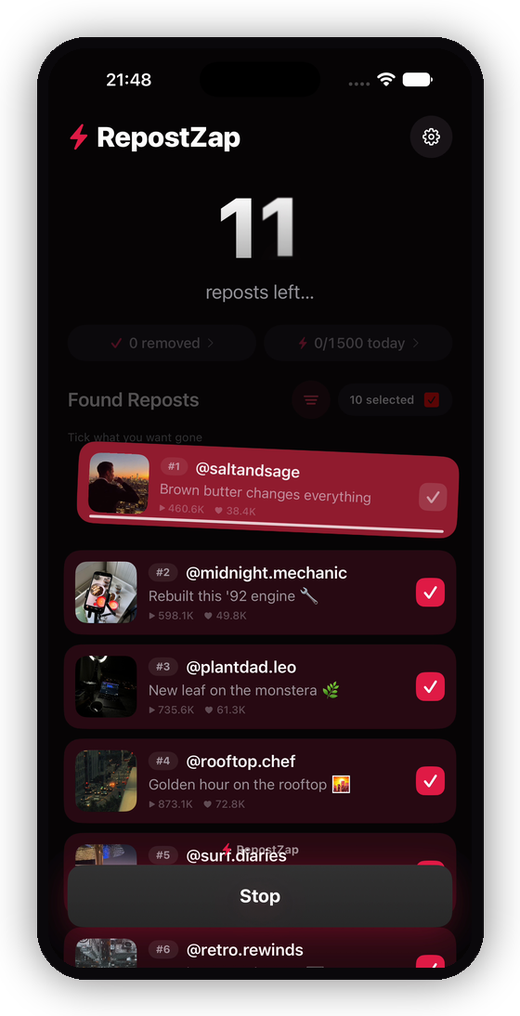
- You log in on TikTok's own page inside the app. Your password goes to TikTok, never to RepostZap.
- It runs from your own session and performs the same "Remove repost" action you'd tap by hand, paced like normal use, not a scripted flood.
- You stay in control. Keep-filters protect recent reposts or favorite creators, nothing is removed until you confirm, every removal is logged locally, and you can stop mid-run.
It's the bulk removal people want an extension for, without pasting your login into a browser tool that breaks next week. See the full walkthrough in how to delete all reposts on TikTok.
Want a desktop or Chrome version?
There isn't one, and there's no RepostZap browser extension either. It's a phone app on both platforms, iPhone (iOS 16+) and Android (7.0+), which is where people manage their TikTok anyway.
Extension vs RepostZap
| Browser extension | RepostZap (iPhone & Android) | |
|---|---|---|
| Where it runs | Desktop Chrome | Native iOS / Android app |
| Your login | Lives in the browser it controls | Entered on TikTok's own page; app never sees it |
| Reliability | Breaks on every TikTok redesign | Maintained; paced like normal use |
| Control | Runs until it errors | Keep-filters, confirm before run, stop anytime |
| History | None | Local log of every removal (CSV export) |
If you only have a few reposts, remove them by hand. If your Reposts tab is measured in screens, use a tool built for it, just not one that lives inside your browser.
Frequently Asked Questions
Is there a Chrome extension to remove all TikTok reposts?
Are TikTok repost remover extensions safe?
Does RepostZap have a browser extension?
How do I remove all my reposts without an extension?
Clear your Reposts tab with RepostZap
Scan your profile, see every repost you ever made, and remove the ones you pick in one pass. Free to download.