How to Repost on TikTok (and How to Undo It) — 2026
Quick Answer
To repost a video on TikTok, tap the Share arrow on the video and choose Repost, and it's added to the Reposts tab on your profile, where your followers and profile visitors can see it. There's no separate setting to switch on; if the Repost option is missing, the creator disabled it or your app is out of date. Undo any repost by tapping Share → Remove repost.
Reposting is TikTok's version of a retweet: one tap that pushes someone else's video to your followers and pins it to your profile. It's simple once you know where the button lives, and just as easy to undo when you change your mind.
How to repost a video on TikTok
- Open the video you want to repost, on your For You feed or anywhere you find it.
- Tap the Share arrow, the curved arrow on the right edge of the screen.
- Tap "Repost." It's usually the first option in the share sheet, with a two-arrows icon.
That's it. The video is now on the Reposts tab of your profile, and TikTok may show it to your followers with a "reposted" label. Tap Repost again (or Remove repost) any time to take it back.
What reposting actually does
A repost isn't a private bookmark; that's what Favorites are for. When you repost, you're publicly recommending a video: it shows on your profile's Reposts tab and can appear in your followers' feeds. It doesn't add the video to your own grid, and it doesn't notify the original creator's followers as if it were yours. For the full breakdown, see what does repost mean on TikTok.
Why there's no "turn on reposting" setting
A common search is how to enable reposting, as if there's a setting to switch on. There isn't: Repost sits in the share sheet by default for everyone. If it's not there, it's one of these:
- The creator disabled reposts for that specific video. Try a different video to confirm.
- Your app is out of date. Update TikTok from the App Store or Google Play, then reopen the share sheet.
- The share sheet mis-loaded. Close and reopen it, or restart the app.
If reposting still fails across several videos, work through why can't I repost on TikTok for the full fix list.
How to undo a repost
Changed your mind? Removing a repost is the same path in reverse:
- One repost: open the video, tap Share → Remove repost. It leaves your profile instantly, and no one is notified. Full steps in how to undo a repost.
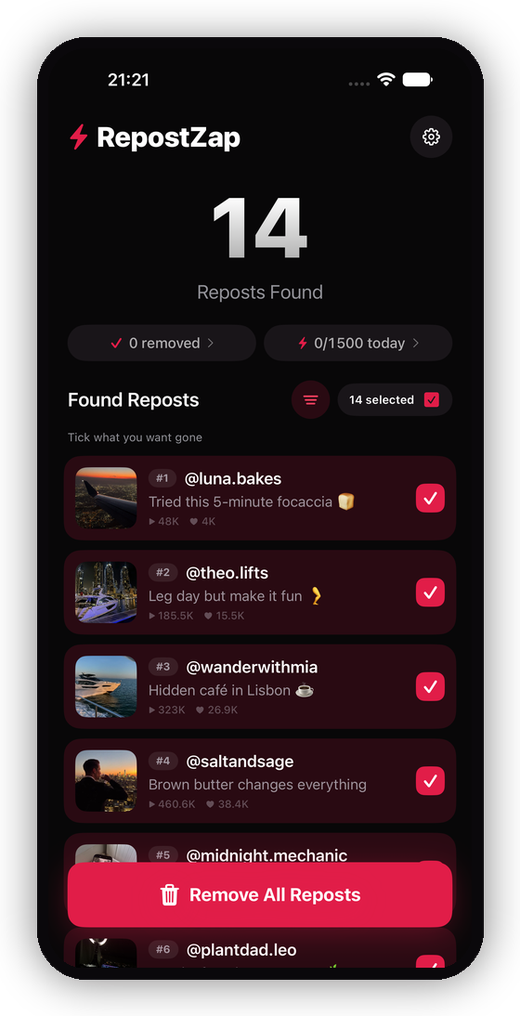
- A whole tab full: if years of reposts have piled up, removing them one by one is slow. RepostZap scans your Reposts tab, lists every repost, and clears the ones you pick in one pass: the same Remove repost action, automated from your own session.
Repost freely; just remember the tab is public, so it's worth a cleanup now and then.
Frequently Asked Questions
How do you repost a video on TikTok?
Why is the Repost button missing on TikTok?
Can you repost your own TikTok?
Who can see the videos I repost?
Clear your Reposts tab with RepostZap
Scan your profile, see every repost you ever made, and remove the ones you pick in one pass. Free to download.