How to Delete All Reposts on TikTok at Once (2026)
Quick Answer
TikTok has no built-in way to delete all reposts at once. You can remove reposts one at a time (open the video → tap Share → Remove repost), or use a repost remover app like RepostZap to scan your Reposts tab and clear everything you select in a single automated pass.
If you've been on TikTok for a while, your Reposts tab has probably grown into a public archive of every video you ever tapped "Repost" on, visible to anyone who visits your profile. Cleaning it up is a common request, and TikTok's own answer is disappointing: there is no select-all, no bulk delete, no "clear reposts" setting anywhere in the app.
That leaves you two real options. Here's both, honestly compared.
Option 1: Remove reposts manually (free, slow)
- Open your Reposts tab. Go to your profile and tap the Reposts tab, the two-arrows icon next to your videos grid.
- Open a reposted video. Tap the first video in the tab.
- Tap the Share arrow. It's the arrow button on the right edge of the video.
- Tap "Remove repost." The video leaves your profile instantly. Go back and repeat for the next one… and the next.
The catch is scale. Each removal takes 10–15 seconds of tapping, and TikTok sends you back to the top of the tab more often than you'd like. At 300 reposts you're looking at over an hour of repetitive tapping, and many long-time accounts have far more.
Option 2: Clear the whole tab with RepostZap (one pass)
- Get RepostZap and connect TikTok. You sign in inside the app via the TikTok app, email, or QR code. Your password goes to TikTok only; RepostZap never sees it.
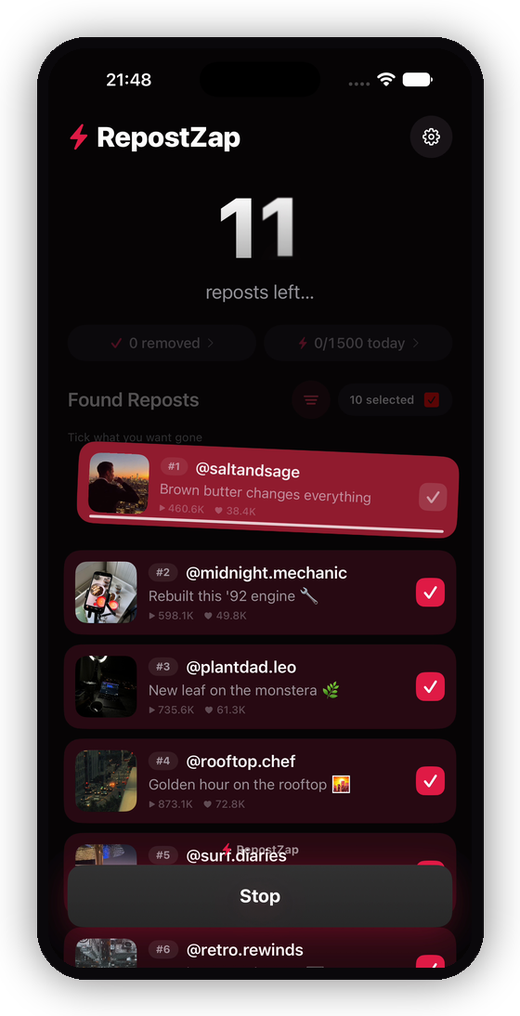
- Scan your profile. The app reads your Reposts tab and lists every repost with covers, creators, and view counts.
- Select what goes. Select all, or use keep-filters to protect recent reposts and favorite creators.
- Remove in one pass. RepostZap performs the same "Remove repost" action on each selected video automatically, paced like normal use. Stop anytime.
This is the same action you'd do by hand, just automated from your own logged-in session, on your own device. Nothing is removed until you confirm the run, and every removal is logged locally so you have receipts.
Which should you pick?
| Manual | RepostZap | |
|---|---|---|
| Cost | Free | Free tier, Pro for big cleanups |
| Speed | ~10–15 s per repost | One automated pass |
| 300 reposts | 1+ hour of tapping | A few minutes, hands-free |
| Control | Full | Full: pick every video, stop anytime |
| Password risk | None | None: login happens on TikTok's own page |
If you only have a handful of reposts, do it by hand. If your Reposts tab is measured in screens, not videos, automation is the sane path.
Frequently Asked Questions
Is there a way to remove all reposts at once inside TikTok?
How long does manual cleanup take?
Does deleting my reposts affect the original videos?
Will people be notified when I remove reposts?
Clear your Reposts tab with RepostZap
Scan your profile, see every repost you ever made, and remove the ones you pick in one pass. Free to download.