TikTok Repost Viewer: How to See Anyone's Reposts (2026)
Quick Answer
There is no special 'TikTok repost viewer' app: every repost already sits on a profile's public Reposts tab (the two-arrows icon), viewable by anyone without a tool and without notifying the owner. To review all of your own reposts with covers and stats in one list, a scanner like RepostZap works as a full repost viewer for your account.
Search "TikTok repost viewer" and you'll find a pile of sites promising a secret window into anyone's reposts, often "anonymous" and "free." Here's the honest version: there is no hidden viewer, because reposts are already public. Every repost lives on a profile's Reposts tab, and anyone can open it without an app, an account trick, or a third-party site.
Is there a TikTok repost viewer?
Not as a separate tool, and you don't need one. When someone reposts a video, it's added to the Reposts tab on their profile (the two-arrows icon next to their video grid). That tab is visible to anyone who can see the profile. So "viewing reposts" is just opening a profile and tapping a tab: no login, no permission, no notification to the owner.
The "anonymous repost viewer" websites are selling access to something that's already open to everyone.
How to view anyone's reposts
- Open the profile. Search the username or tap it from a video.
- Find the Reposts tab. It's in the row above the video grid, after Videos: the icon with two curved arrows.
- Scroll. Every video that account has reposted is listed, newest first.
Two limits worth knowing: if the account is private, only approved followers see the tab; and if the person turned their repost feed off or never reposted, the tab may be empty. Viewing is anonymous by default, because TikTok doesn't record or reveal who opened a Reposts tab.
View all of your own reposts at once
Your own Reposts tab works the same way, but scrolling it is a poor way to actually review your history: there's no count, no dates, and no way to act on more than one video at a time.
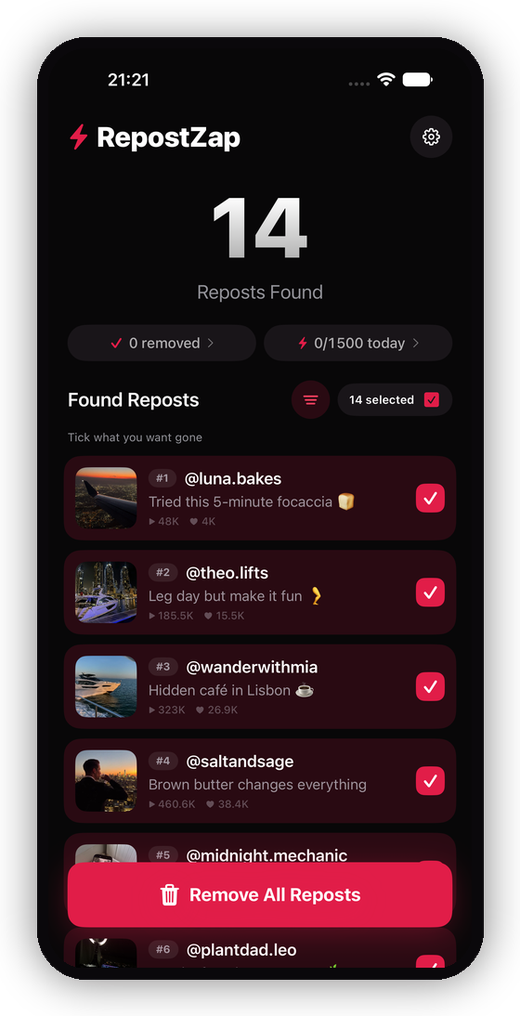
This is where a scanner becomes a genuine repost viewer for your account. RepostZap signs in on TikTok's own page, reads your Reposts tab, and lists every repost with its cover, creator, and view count, so you can see your whole repost history at a glance and, if you want, remove the ones you'd rather not have public. It's the overview TikTok never gives you.
Can you see who viewed or reposted your video?
This is the other half of what "repost viewer" searchers are asking, so plainly:
| Question | Answer |
|---|---|
| Who viewed my repost? | TikTok shows no viewer identities for reposts: no list, no count, no notification. |
| Who reposted my video? | TikTok doesn't give creators a list of accounts that reposted it. |
| Can others see that I reposted something? | Yes, it's on your public Reposts tab. |
| Does anyone get notified when I view their reposts? | No. Viewing is anonymous. |
If a site claims it can reveal who viewed your reposts, it's guessing or lying, because that data isn't exposed by TikTok to anyone.
Are "anonymous repost viewer" sites safe?
Skip them. Because the Reposts tab is already public and already anonymous to view, these sites offer no real capability. What they do often ask for is a login, a session cookie, or a "connect your account" step, which is exactly how accounts get compromised. There is no safe reason to hand your TikTok session to a random web viewer to look at something you can already open yourself.
If you want to review or clean up your own reposts, do it from your own logged-in session: open your Reposts tab, or see your full repost history and clear the ones you don't want with RepostZap, with no password sharing and nothing removed until you confirm.
Frequently Asked Questions
Is there an anonymous TikTok repost viewer?
Can you see who viewed your repost on TikTok?
Can you see who reposted your video on TikTok?
Who can see my reposts on TikTok?
Clear your Reposts tab with RepostZap
Scan your profile, see every repost you ever made, and remove the ones you pick in one pass. Free to download.